
Can You Really Leave a WhatsApp Group Secretly?
Yes, you can leave WhatsApp group secretly in 2026, and it is easier than most people think.
A few years ago, leaving a group meant a public announcement. Everyone saw the dreaded “Rahul left” message in the chat, and then came the awkward questions. “Why did you leave?” “Are you angry with us?” Those days are over.
Also Read

In 2022, WhatsApp changed the rules. Now, when you exit a group, only the group admins get notified. Regular members see absolutely nothing. No message, no alert, no drama.
In this guide, you will learn 3 simple tricks to leave WhatsApp group secretly without any awkwardness. We will also show you exactly what admins see, so there are no surprises.
- Can You Really Leave a WhatsApp Group Secretly?
- Trick 1: Just Leave, Only Admins Will Know
- Trick 2: Mute and Archive Instead of Leaving
- Trick 3: Exit and Delete for a Clean Break
- What Does the Group Admin Actually See?
- Mute vs Archive vs Exit: Which Should You Choose?
- Frequently Asked Questions
- Conclusion
Can You Really Leave a WhatsApp Group Secretly? The Honest Answer
Short answer: yes, mostly. But let us be honest about what “secretly” really means, because it has limits you should know.
Before 2022, it was impossible to leave WhatsApp group secretly. Every single member got a big notification in the chat. WhatsApp heard years of complaints and finally flipped the behavior: now only admins are told, and everyone else stays in the dark.
So if your goal is to slip out of a 200-member group without 200 people asking questions, the system is on your side. If you want to leave WhatsApp group secretly today, you are working with the app, not against it. But keep these three caveats in mind:
- Group admins WILL know. There is no trick, setting, or workaround that hides your exit from an admin.
- Your name stays in the “Past members” list inside Group Info for up to 60 days. Anyone curious enough to check will find you there.
- In tiny groups (5 to 10 people), your absence is obvious even without a notification. People notice when a familiar name vanishes from the member list.
With that honest picture in mind, here are the 3 tricks, ordered from simplest to most thorough.
Trick 1: Just Leave, Only Admins Will Know
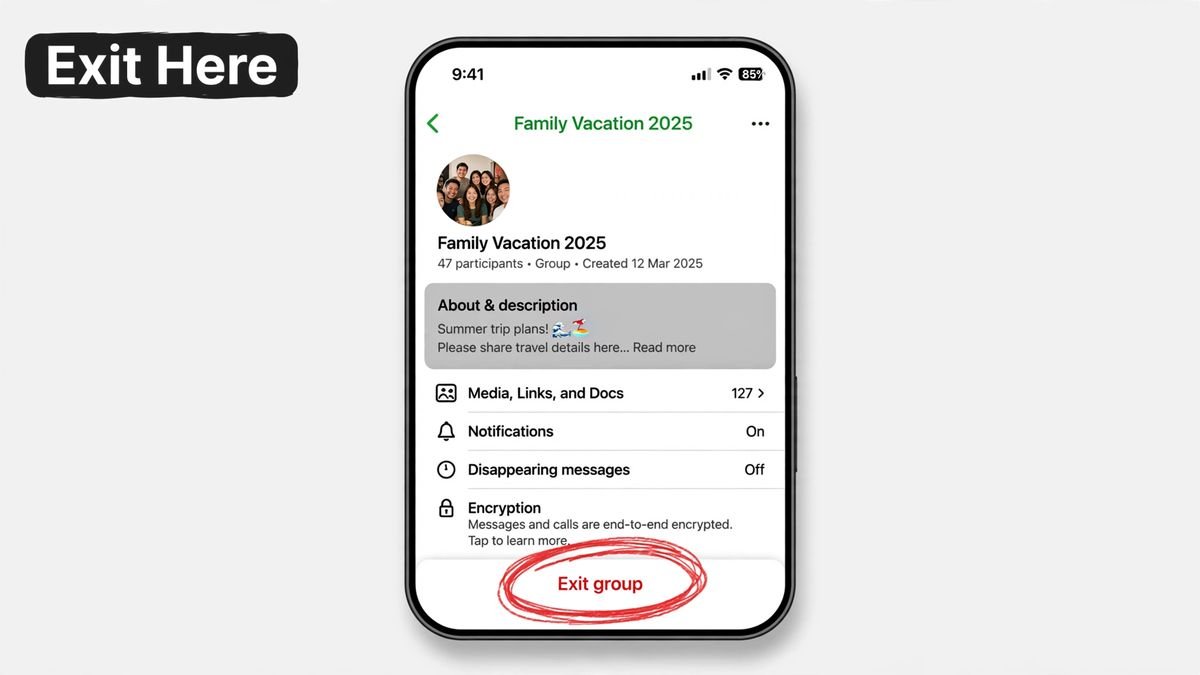
This is the simplest way to leave WhatsApp group secretly, and honestly, for most people it is the only trick they will ever need.
Here is what happens: you tap “Exit group”, confirm, and you are out. No message appears in the chat. Your fellow members keep talking like nothing happened. Only the admins receive a quiet notification.
Follow these steps:
- Open WhatsApp and tap the group you want to leave.
- Tap the group name at the top to open Group Info.
- Scroll all the way down and tap “Exit group”.
- A popup asks for confirmation. Tap “Exit group” again.
- Done. You stop receiving messages immediately.
Once you understand this behavior, you can leave WhatsApp group secretly from any large group with total confidence.
This trick shines in large groups. In a 500-member city group or deals group, your exit is a drop in the ocean. Even the admins probably will not give it a second thought. For most readers, this single method is enough to leave WhatsApp group secretly for good.
Where it falls short: groups where you are personally known to the admin. Leaving your family group? Your uncle (the admin) will absolutely notice. Also, if you want to leave WhatsApp group secretly from a small, tight-knit group, remember that silence itself can be loud. People will notice you are gone from the member list even without a notification.
You can read more about group controls in WhatsApp’s official group settings guide.
Trick 2: Mute and Archive Instead of Leaving
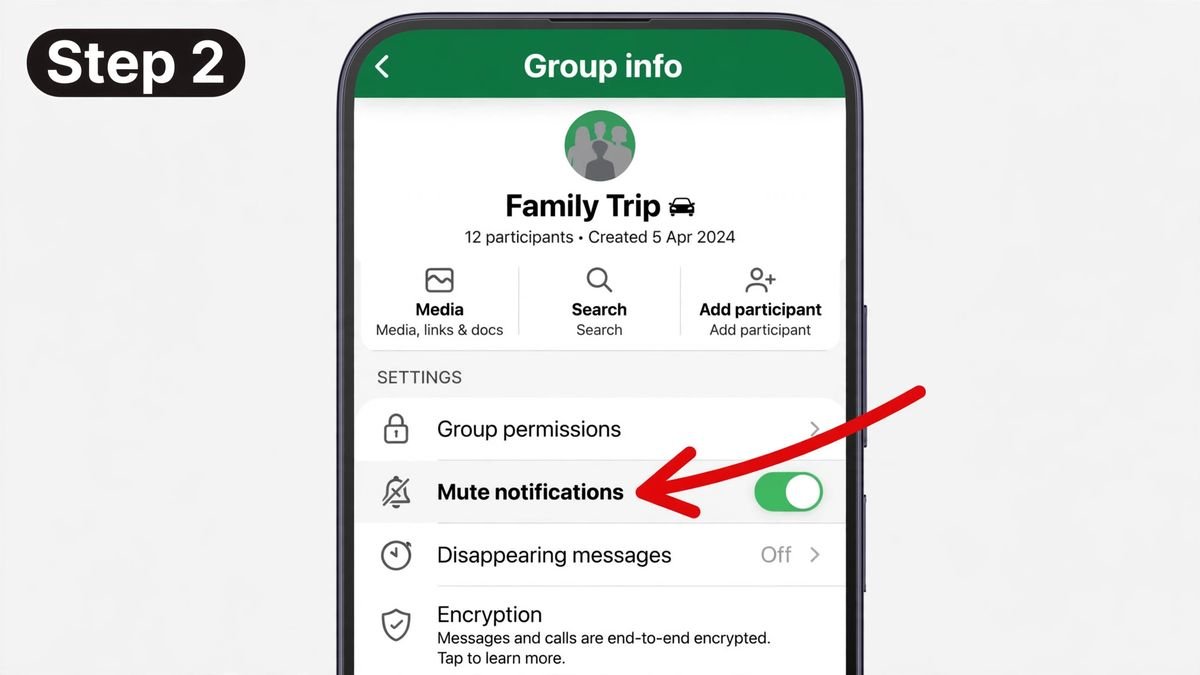
What if even the admin finding out feels like too much? Then do not leave at all. This trick lets you vanish from a group without technically exiting, which means zero notifications to anyone, admins included. It is the closest thing to leave WhatsApp group secretly without leaving.
Muting kills all notifications. Archiving removes the chat from your main chat list. Put them together and the group effectively stops existing in your daily life, while on paper you are still a happy member.
Here is how:
- Open the group chat and tap the group name.
- Tap “Mute notifications” and choose “Always”. Your phone will never buzz for this group again.
- Go back to your chat list. Long-press the group chat.
- Tap the archive icon (the box with a downward arrow). The chat moves into your Archived folder.
That is the whole trick. The group is now buried. New messages will not pop it back to your main list. You can still open your Archived chats anytime to catch up, and you can unarchive whenever you want.
This is the best option when leaving would cause real-world drama: family groups, office teams, housing society chats. Nobody knows you checked out, because as far as WhatsApp is concerned, you never did.
One honest limitation: you are still a member. If someone directly tags you with @yourname, you will not hear about it unless you go looking. And this does not help if your goal is to actually leave WhatsApp group secretly in the sense of being removed from the member list. For that, Trick 1 or Trick 3 is what you need.
Trick 3: Exit and Delete for a Clean Break
Sometimes muting is not enough. You want the group gone. No chat in your list, no old messages, no media clogging your gallery. This trick gives you the cleanest possible break, and it is the nuclear option to leave WhatsApp group secretly and erase everything from your phone.
When you tap “Exit group” today, WhatsApp offers two choices:
- Exit group: you leave, but the chat history stays on your phone.
- Exit and delete for me: you leave, and the entire chat vanishes from your Chats list.
Choose the second option for a true fresh start. You can also tick a box to delete all media from that chat out of your phone gallery.
Steps:
- Open the group and tap the group name at the top.
- Scroll down and tap “Exit group”.
- Select “Exit and delete for me” instead of plain “Exit group”.
- Optionally, tick “Delete media received in this chat from the device gallery”.
- Confirm. The group disappears from your phone completely.
Two things to remember. First, this only cleans YOUR phone. Messages you sent still sit on everyone else’s phones. WhatsApp cannot wipe your history from their devices. Second, the admin notification still applies. There is no version of exiting where the admin stays uninformed, so if your goal is to leave WhatsApp group secretly from the admin too, Trick 2 is your only real option.
Use this trick for groups you never want to think about again: spammy deal groups, dead college batches, that random group a stranger added you to at midnight.
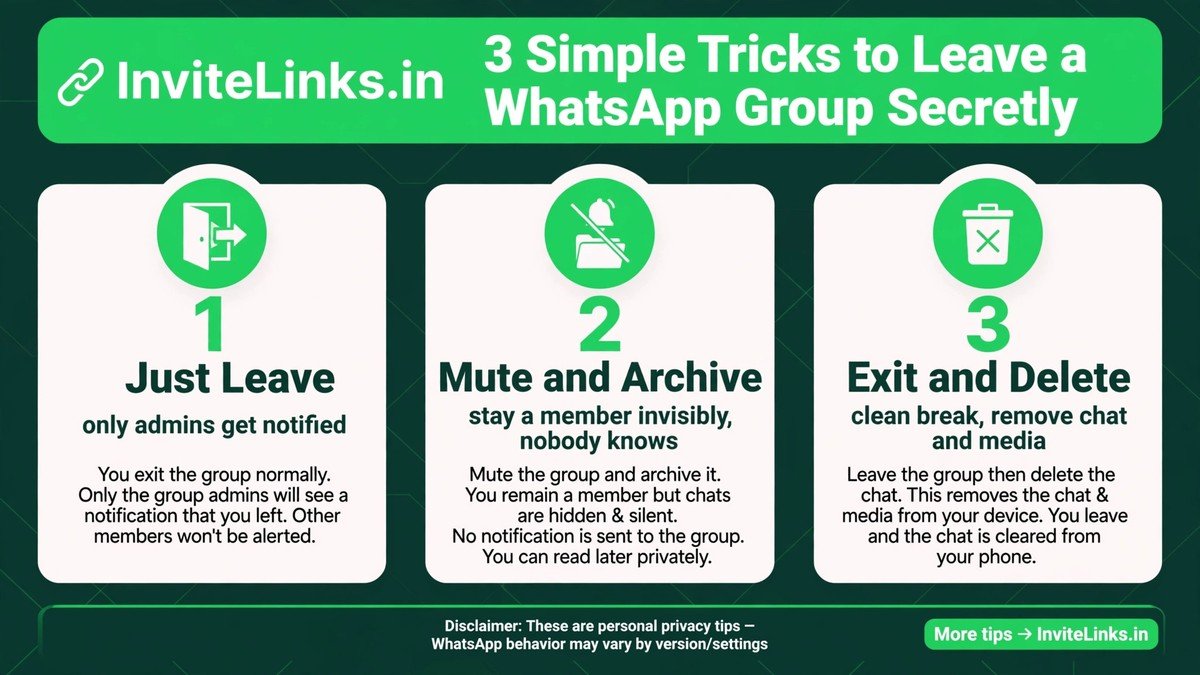
What Does the Group Admin Actually See?
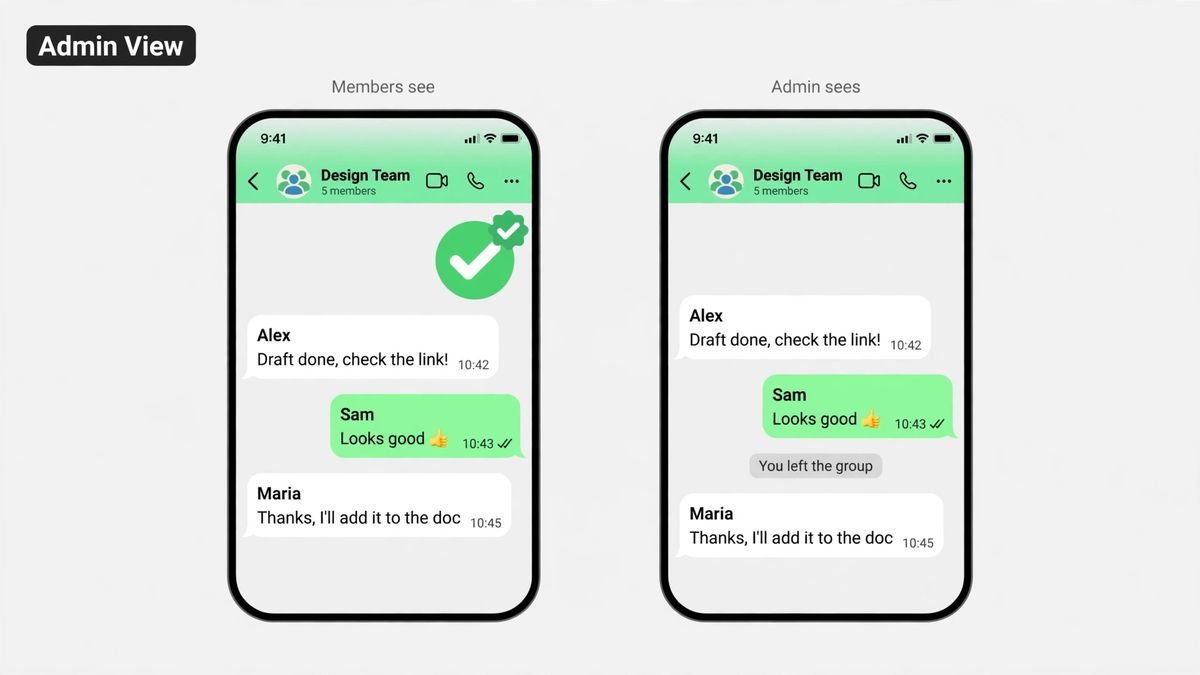
Let us pull back the curtain completely. When you leave WhatsApp group secretly, here is exactly what the admin sees and what they do not. That is the full, honest picture of what it means to leave WhatsApp group secretly in 2026.
What the admin DOES see:
- A notification that you left the group. It does not appear as a chat message for everyone, but the admin gets told.
- Your profile name, phone number, and (depending on your privacy settings) your profile photo, listed under Group Info, in the “Past members” section.
- This Past members entry stays visible for up to 60 days after you leave.
What regular members see:
- Nothing. No chat message, no system alert, no change they would notice unless they open the member list and start counting.
What NOBODY sees:
- Your reason for leaving. WhatsApp never shares why someone exited.
- Whether you muted or archived before leaving. Those actions are fully private.
- Anything about Trick 2 at all. Muting and archiving generate zero signals of any kind.
Bottom line: you are invisible to 99 percent of the group, but the admin has a 60-day window where your departure is an open record. If the admin is the person you are trying to avoid, do not exit. Mute and archive instead.
Mute vs Archive vs Exit: Which Should You Choose?
Still confused about the best way to leave WhatsApp group secretly? This quick comparison makes the choice obvious.
| Feature | Mute | Mute + Archive | Exit |
|---|---|---|---|
| You stay a member | Yes | Yes | No |
| Notifications | Silent | Silent + hidden | Gone (you are out) |
| Admin notified | No | No | Yes |
| Chat in main list | Yes | No | No |
| Past members record | N/A | N/A | 60 days |
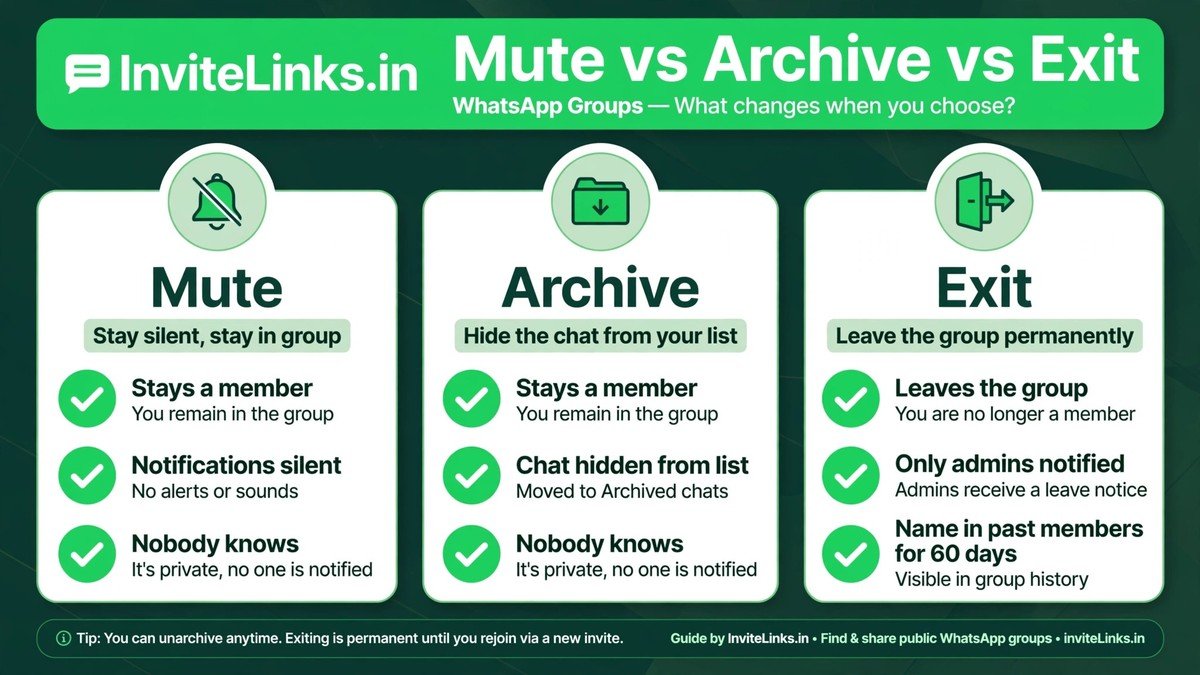
Simple rule: if the admin must never know, go with mute plus archive. If you do not mind the admin knowing but want zero fuss from members, just exit. If you want every trace gone from your phone, exit and delete.
Frequently Asked Questions
Here are the questions readers ask most about how to leave WhatsApp group secretly.
Will other members know if I leave a WhatsApp group?
No. Since the 2022 privacy update, regular members receive no notification whatsoever. Only group admins are informed when you leave WhatsApp group secretly.
Can an admin see that I muted or archived the group?
No. Muting and archiving are 100 percent private actions. Nobody, including admins, gets any notification or indicator. It is the safest way to disappear without a trace.
How long does my name stay in the Past members list?
Up to 60 days. Your profile name and phone number remain visible under Group Info, in Past members, to anyone who opens it during that window. Even when you leave WhatsApp group secretly, this record stays for 60 days.
Can I rejoin a group after leaving it?
Only if a group admin adds you back or sends you a fresh invite link. WhatsApp does not let you rejoin on your own after exiting.
If I leave a community subgroup, do I leave the whole community?
Yes. WhatsApp Communities work as a bundle: leaving a subgroup removes you from the parent community as well. Keep that in mind before you tap exit, and check the WhatsApp Help Center if you are unsure how your community is set up.
Conclusion
Leaving a group no longer has to be awkward. You now know how to leave WhatsApp group secretly in three different ways: a straight exit for big groups, mute plus archive when the admin cannot know, and exit plus delete for a total clean break. Bookmark this guide for the next time you need to leave WhatsApp group secretly without stress.
Pick the trick that matches your situation, and take control of your chat list again.
Want to find better groups worth staying in? Browse our active WhatsApp group links and check our latest guides for more WhatsApp tips. You can also join new communities anytime.